Service oversight
Review current calls and waits, configured service targets and recent activity. The meaning of a metric depends on the available source and service configuration.


Operational supervision and human quality review
Help supervisors inspect what is happening across services and where a person should look next. Meridian Guardian combines operational views and review cues, while keeping uncertain signals separate from clinical decisions.
Guardian is presented here as the supervision and quality area of Meridian. It brings live and recent service activity into a supervisor view so managers can inspect waits, current work and configured alerts. Human quality review provides a separate way to look at how a conversation was handled. It should not be confused with Risk Guardian, which is a distinct clinical demonstrator rather than a validated autonomous risk engine.
Supervisors, service managers and quality reviewers who need operational context and a clear reason to inspect a conversation or queue. Staff monitoring and any sensitive evidence require an agreed purpose and access policy.
Review current calls and waits, configured service targets and recent activity. The meaning of a metric depends on the available source and service configuration.
Operational alerts can carry a reason and service reference for a supervisor to inspect. A notification is not a substitute for reviewing the underlying situation.
Inspect handling and selected conversation evidence under the agreed retention and access model. Do not assume a transcript will remain available indefinitely.
Configured listening profiles may expose topic, concern or other derived cues. Experimental language or voice signals remain advisory and require human interpretation.
Receive service and conversation events within the configured scope.
Build the supervisor view from current runtime state and retained operational records.
Present an operational threshold or configured advisory cue with its context.
A supervisor reviews the relevant source and decides whether further action is justified.
Follow the applicable review or operational workflow, preserving the decision and its limits.
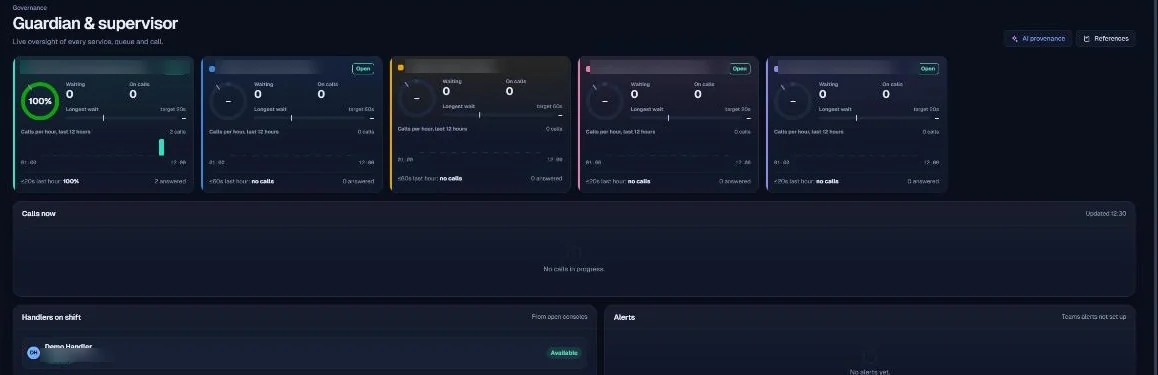
A supervisor’s view of service activity, selected operational alerts and review context. Any advisory cues should retain their source, uncertainty and intended use so a person can decide what they mean.
The explanation below describes the reviewed implementation and configuration boundaries. It does not assert a completed production deployment.
| Component | Technical mechanism | What to verify |
|---|---|---|
| Supervisor projection | The runtime assembles active-call state, service configuration, recent answer times and waiting information. | In-process state can be lost on restart. A live view is not proof of complete historical monitoring. |
| Activity source | The reviewed supervisor code can use imported phone-system logs when present, otherwise relevant application call records. | Those sources have different coverage. A percentage should not silently imply a full telephony picture. |
| Event delivery | The runtime hub publishes supervisor alerts and console updates; configured destinations may receive operational notifications. | Assess the exact notification fields, recipient controls and failure handling before enabling external delivery. |
| Language cues | Guardian observations use bounded caller utterances and a configured listening profile; optional model assistance is controlled separately. | Emotion, concern or voice metrics do not establish a diagnosis, validated stress measure or autonomous clinical triage. |
| Role boundaries | Supervisor and governance routes coexist with platform roles and edition checks. | Validate actual route/object permissions and staff-monitoring access; a hidden screen is not a complete access control. |
| Related clinical module | Risk Guardian has its own demonstrator boundary and evidence paths. | Do not infer that an operational supervision page means clinical risk scoring has been validated or approved. |
Define who can see staff activity, call identifiers and review evidence. Agree retention and the response to missing logs or service failures. Test alert noise and unavailable sources. Treat derived voice or language cues as experimental reference material rather than proof about a person’s health or state.
Meridian is a composed modular application. Customer-specific Azure resources, Entra configuration, routed storage and the shared AI gateway form part of the deployment design. Actual role coverage, data flows, provider regions, retention and recovery must be checked in the target environment.
The supplied source review identifies v23.1.0 Helpdesk Plus as its runtime baseline. It records incomplete targeted tests and no live Azure or Graph verification. Read the dated assurance summary before interpreting source capabilities as production readiness.
No. The operational supervision area described here is distinct from the Risk Guardian clinical demonstrator. Neither label establishes a validated diagnosis or autonomous triage claim.
A supervisor should inspect the context and follow the agreed service procedure. An alert is a signal to review, not an automatic clinical instruction.
Coverage depends on configured sources, retained data and runtime state. The page should not imply uninterrupted monitoring through every outage.
Based on the supplied design archive and local v23.1 source baseline. These references identify the reviewed implementation; they are not links to a publicly exposed code repository.