Ticket workspace
Review requester information, assign the ticket and maintain comments and status. Voice-enabled business services can create mapped-answer and transcript snapshots.


Requests, service targets, inventory and reviewed assistance
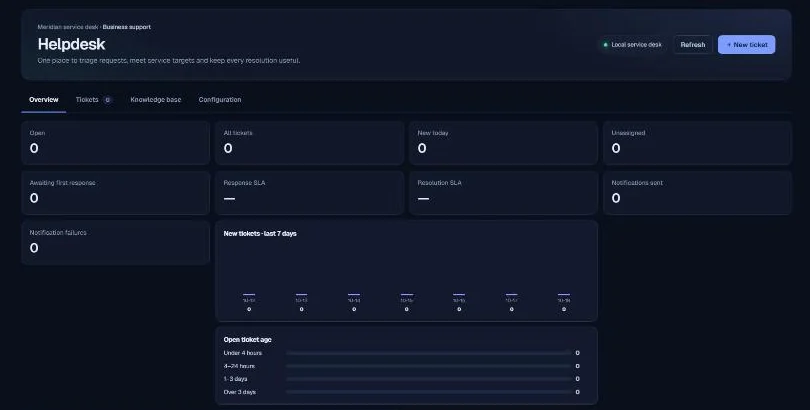
Bring business-support requests into a structured workspace. Track ownership, response and resolution targets, comments and linked inventory, while keeping AI suggestions separate from saving or sending.
Service Desk supports business IT and other explicitly enabled non-healthcare services. A request has a subject, description, category, priority and status, with optional requester and inventory details. Agents can assign work, record internal comments and prepare requester replies. The product connects the operational queue with the context needed to resolve it, rather than treating an AI suggestion as a completed ticket.
Support agents, service managers and IT or estates teams. It is a business-support module; it does not turn ticketing into an approved clinical record or a patient-facing triage service.
Review requester information, assign the ticket and maintain comments and status. Voice-enabled business services can create mapped-answer and transcript snapshots.
Configure elapsed time or business-hours targets, timezone, working days, pause statuses and priority-specific response and resolution windows.
Link hardware or software records to the request, with warranty, renewal and licence-use information available for review.
Request an AI suggestion from active articles, or review the staff wallboard’s limited queue projection. Neither capability removes access or content-review responsibilities.
Create the request or review the snapshot received from a configured voice service.
Optionally search the organisation directory and review the editable requester fields.
Choose category, priority, owner and any relevant asset.
Inspect a suggested response and its source titles, then explicitly apply, save or send.
Record the outcome and review the response and resolution timing.
A structured ticket, its conversation or answer snapshot where configured, assignment and asset context, comment history and calculated service targets. A requester reply has a separate explicit send and delivery check.
The explanation below describes the reviewed implementation and configuration boundaries. It does not assert a completed production deployment.
| Component | Technical mechanism | What to verify |
|---|---|---|
| API and store | Helpdesk domain services and routes store tickets, comments, assets, active articles and settings in the configuration area. | Configuration includes personal and business data. Records-area sealing and retention do not automatically cover it. |
| SLA calculation | Deterministic date/time calculations apply the service calendar, timezone, priority and pause/resume state. | These are operational target calculations, not a contractual uptime SLA. |
| Directory lookup | The optional Microsoft Graph search returns a bounded set of directory results for an agent to inspect. | Successful directory search does not authenticate the requester or prove email delivery is configured. |
| AI assistance | The runtime matches active Helpdesk articles, bounds their excerpts and invokes the registered helpdesk.assist task. | The active-article flag is separate from Knowledge Studio’s approval lifecycle. Source titles do not validate every generated sentence. |
| Wallboard projection | The server omits requester names, contacts, descriptions and transcripts from a projection limited to 30 open tickets. | Owner labels, ticket identifiers and categories remain. The wallboard is a staff display, not anonymous public data. |
| Concurrency | Ticket snapshots and whole-document writes preserve independent copies of source context. | Later source edits do not automatically synchronise snapshots. Concurrent edits and duplicate side effects need validation. |
Exercise business-hours and daylight-saving cases, paused requests, directory failures and AI timeouts. Decide who can access tickets and the wallboard, and agree retention for requester information and transcript snapshots. Loading synthetic seed data is a controlled administrator action and sends no notifications.
Meridian is a composed modular application. Customer-specific Azure resources, Entra configuration, routed storage and the shared AI gateway form part of the deployment design. Actual role coverage, data flows, provider regions, retention and recovery must be checked in the target environment.
The supplied source review identifies v23.1.0 Helpdesk Plus as its runtime baseline. It records incomplete targeted tests and no live Azure or Graph verification. Read the dated assurance summary before interpreting source capabilities as production readiness.
No. The reviewed projection contains up to 30 open-ticket rows with additional summary information. It should not be presented as a full export.
The assistance response is a suggestion. Applying, saving, sending and publishing are separate human actions.
Not by itself. Helpdesk active articles and Knowledge Studio approvals use different mechanisms, which the Knowledge Control page explains.
Based on the supplied design archive and local v23.1 source baseline. These references identify the reviewed implementation; they are not links to a publicly exposed code repository.