Episode queue
Search the queue and filter new, queued, in-progress, awaiting-external and closed episodes. Inspect case type, patient reference, service, owner and summary.

New care-coordination range
 Local product demonstrator
Bring reviewed intake, encounters, follow-up tasks and case context into a human-owned episode timeline.
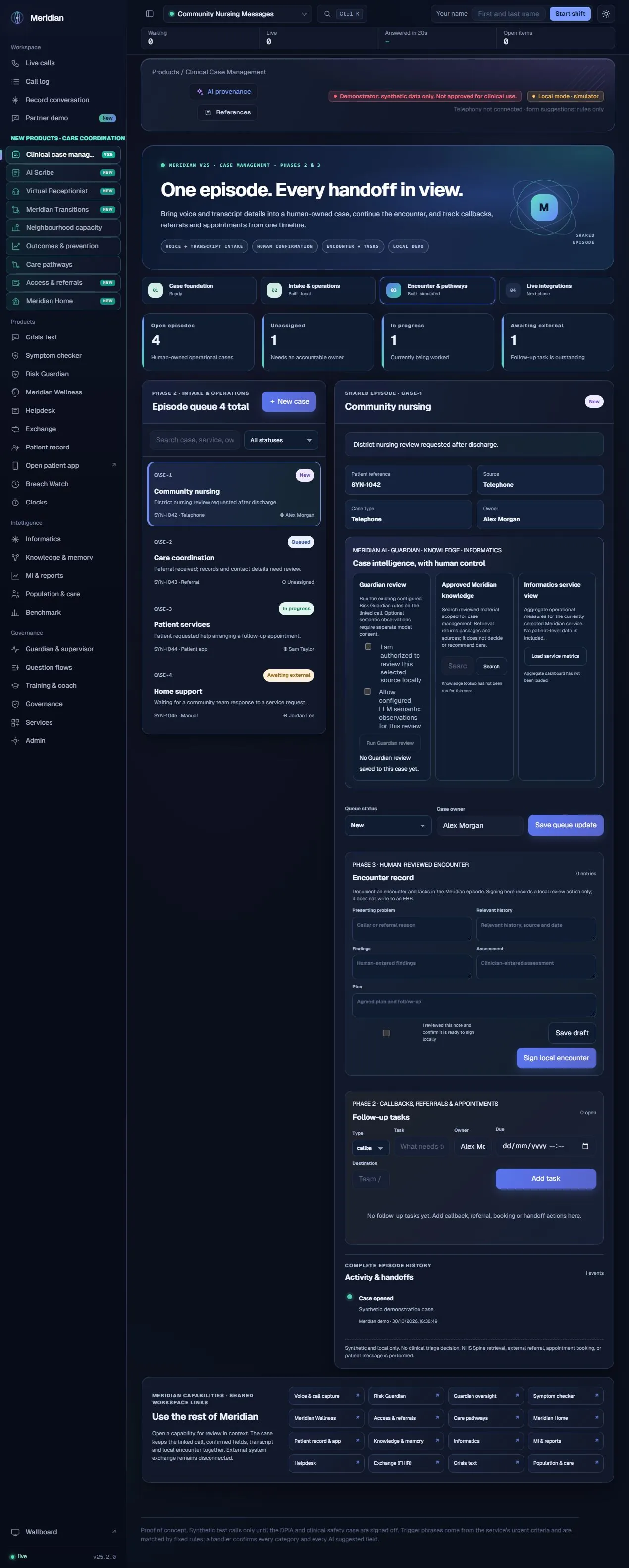
For teams coordinating a case across calls, documentation and follow-up, this workspace keeps the reason for contact, accountable owner, operational status and activity history together. It helps a team see what has already been captured and what still needs a person’s attention. The local case is a coordination record, not an electronic patient record replacement.
The actual assistance
The workspace connects selected Meridian AI capabilities rather than applying an invisible model to every case. Staff can explicitly review a linked call with Risk Guardian, separately opt in to configured model-assisted semantic observations, retrieve approved case-management passages, and inspect aggregate Informatics measures. Retrieved knowledge supplies context; it does not recommend care. Clinical fields, priority, signature and next actions remain human decisions.
Human ownership
A synthetic local demonstrator. No NHS Spine retrieval, production patient-identity verification, EHR write-back, external booking, referral transmission or clinical triage is established. Local signing records a human review action within Meridian.
Search the queue and filter new, queued, in-progress, awaiting-external and closed episodes. Inspect case type, patient reference, service, owner and summary.
Select a finished Meridian call or recording, preview captured fields and choose which reviewed values to bring into a case. Transcript attachment requires a separate choice; source-list availability depends on the local source endpoint.
Create a blank or imported case, assign an owner, change operational status and retain the selected source reference.
Document presenting problem, relevant history, findings, assessment and plan. Save a draft or record an explicit local review/signature action.
Create callbacks, referrals, appointments, patient communications, pathway reviews and external handoffs with a task owner, due date and destination.
Review the selected linked source with configured rules; optional language-model observations require separate consent. Save only a human-confirmed summary and labels.
Search content scoped to case management and inspect returned passages and sources beside the case.
Load aggregate service metrics from Informatics without treating aggregate measures as patient-specific assessment.
Inspect episode creation, encounter entries, ownership changes and recorded task events in a chronological local history.
Open Voice, Access, Pathways, Home, the patient workspace, Knowledge, Intelligence and other Meridian modules. Navigation does not imply automatic record synchronisation.
Confirm a source or create a blank episode.
Choose service, case type, owner and queue status.
Draft structured documentation and inspect selected context.
Create named tasks with due dates and destinations.
Save reviewed notes and local task outcomes to the timeline.
| Area | Mechanism and scope |
|---|---|
| Source handling | The case source API exposes selected local Meridian calls and recordings. Imported fields and optional transcript attachments are reviewed before case creation. |
| Persistence and provenance | The case module records episode data, local encounter entries, task state and activity events using the configured application store. |
| AI boundaries | Risk Guardian review, scoped knowledge retrieval and service-level Informatics are separately invoked. A module link does not share patient identity across every module. |
| External systems | Local signature and task records do not execute an EHR write, external referral, calendar booking or patient message. |
Content checked against the v25.2.0 source and visible local workspace on 30 October 2026. This is a product description and interface inspection, not an end-to-end deployment or clinical validation.
routes/case_management.py; CASE_MANAGEMENT_BASELINE.md; RELEASE_NOTES_v25.1.0.md
Review assurance scopeNo. The current implementation is a local case and coordination workflow. Production record keeping and external interfaces require separately approved implementation and validation.
No. The reviewer explicitly selects context and invokes the available Guardian, Knowledge or Informatics actions.